


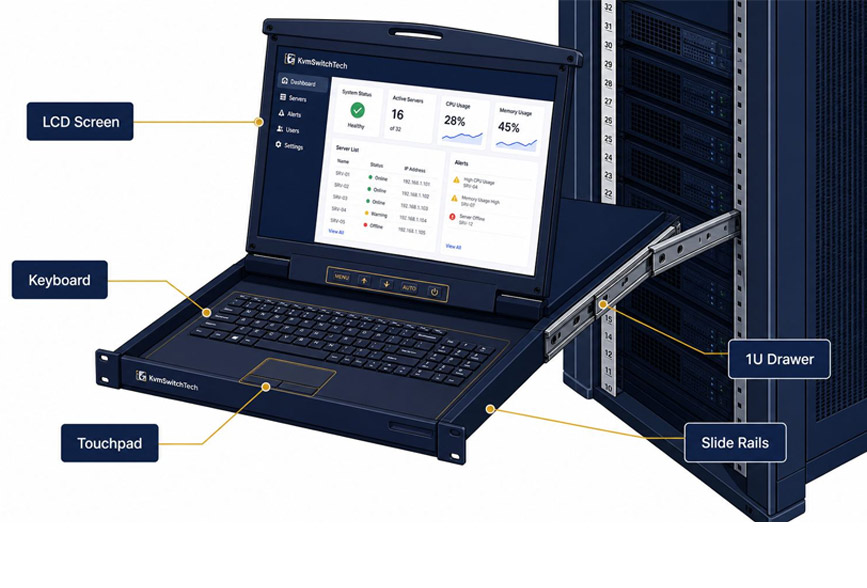
Server rooms and data centres must accommodate an increasing amount of equipment within limited rack space. Servers, network switches, storage systems, and power distribution units all compete for room, leaving IT teams with little space for conventional desktop monitors. A 1U rack mount monitor offers a practical way to provide local display access while keeping the installation organised.
Designed around the standard 1U rack height of 1.75 inches (44.45 mm), these monitors can help administrators access server consoles without dedicating valuable rack space to a separate desktop display. Depending on the design, a solution may feature a rack-mounted display panel or an integrated LCD console drawer with a keyboard and touchpad.
Choosing the right model involves more than measuring rack height. Display quality, video connectivity, mounting depth, cable management, and compatibility with the existing infrastructure all influence the result.
This guide explores the key considerations for selecting a 1U rack mount monitor for professional IT environments.
What Is a 1U Rack Mount Monitor?
A 1U rack mount monitor is a display solution designed for installation in a standard equipment rack. Its compact form helps IT teams access visual information from connected servers or other compatible equipment without relying on a separate desktop monitor.
Some models provide a display panel that mounts directly into a rack. Others combine an LCD screen with a keyboard and pointing device in a pull-out console drawer, allowing administrators to operate connected systems from the rack itself.
These configurations serve different requirements. A standalone rack-mounted display may suit installations where a keyboard and mouse are already available. An integrated console drawer can be more convenient when technicians need a complete local management interface in a compact footprint.
The term “1U” describes the rack height occupied by the equipment, not necessarily its screen size or the total depth required for installation. Buyers should check the manufacturer’s dimensions and mounting requirements before selecting a model.
Why Rack Space Matters in Server Rooms
Rack space is a limited resource in many IT environments. Every additional device must fit within the rack while allowing sufficient room for cabling, cooling, and maintenance.
A conventional desktop monitor may require a shelf or an external workstation. It can also introduce extra cables and occupy space that could otherwise accommodate infrastructure equipment.
A rack-mounted display can reduce these challenges by keeping the screen within the rack layout. An integrated console drawer may also combine several functions into a single unit.
The main advantages include:
- More efficient rack utilisation: Compact mounting helps avoid using a separate shelf for a local display.
- Centralised console access: Technicians can operate compatible systems from the equipment rack.
- Reduced desktop clutter: The display and associated controls can be stored within the rack when not in use, depending on the design.
- A more organised installation: Purpose-built mounting can help keep the console equipment aligned with the rest of the rack.
- Convenient maintenance: Local access can simplify tasks such as checking startup messages or troubleshooting display output.
The actual space savings depend on the product configuration. Before purchasing, compare the rack units occupied by the monitor or console with the space required by the existing arrangement.
1. Check the Display Size and Resolution
Display size affects how easily administrators can read text, inspect system messages, and navigate graphical management interfaces. Rack-mounted monitors must balance usability with the physical restrictions of the installation.
A compact screen may be suitable for command-line administration, basic diagnostics, and routine console access. A larger display can be useful for graphical interfaces, configuration utilities, or applications that present several panels of information.
Resolution is equally important. A higher resolution can provide more workspace, but the benefit depends on the physical screen size, scaling settings, and the output supported by the connected system.
When comparing displays, consider:
- Screen diagonal and visible display area.
- Native resolution and supported refresh rates.
- Brightness and contrast specifications.
- Viewing angles for the intended mounting position.
- Text clarity at the distance technicians will normally work.
- Compatibility with the server’s graphics output.
For example, a monitor used mainly for firmware configuration and text-based troubleshooting may not require the same display capabilities as one used for graphical server management.
The best choice is a display that remains readable in the actual rack environment without adding unnecessary size or cost.
2. Verify Video Connectivity
Video compatibility should be checked before selecting a rack mount monitor. The display must accept a signal from the connected server, KVM switch, or other source.
Common video interfaces include VGA, HDMI, and DisplayPort, although availability varies by model and equipment generation. Some installations also use adapters to connect devices with different interfaces.
Check the source equipment and monitor specifications together. Confirm the connector type, supported resolution, refresh rate, and any requirements associated with signal conversion.
If the monitor will be connected through a KVM switch, verify the complete signal path. A KVM switch may support a particular video standard or resolution that differs from the monitor’s capabilities.
For installations containing older and newer servers, connector compatibility can be especially important. An older system may use VGA while newer equipment provides digital video output. The selected monitor or intermediary equipment must accommodate the intended connections.
Avoid assuming that a physical adapter guarantees full compatibility. Some adapters support only particular signal types or resolutions. Confirm their specifications and test the configuration before deploying it across multiple racks.
3. Measure Rack Height, Depth, and Mounting Space
A monitor advertised as 1U rack-mounted equipment must fit the available installation space. Rack height is only one part of the measurement process.
Before ordering, check the following dimensions:
Rack height: Confirm that the available rack units match the product’s specified mounting requirements. Ensure adjacent equipment does not interfere with the screen or drawer.
Rack depth: Measure the usable depth between the mounting rails and any rear obstructions. Include room for cables, connectors, and ventilation.
Rail compatibility: Verify that the mounting hardware suits the rack and the spacing between its rails. Check whether additional brackets or rails are required.
Operating clearance: If the unit slides or folds out, allow enough space for the screen and controls to be opened safely.
Cable routing: Ensure video and power cables can be connected without excessive bending or pressure on the connectors.
An integrated LCD console drawer may need additional clearance when extended, even if its closed position occupies only a small amount of rack space. Technicians should be able to open and operate it without obstructing nearby equipment or access routes.
Taking measurements before purchasing helps prevent installation delays and unnecessary hardware returns.
4. Decide Between a Standalone Monitor and an LCD Console Drawer
Not every server room needs the same type of rack-mounted display. The choice between a standalone monitor and an integrated console drawer depends on how technicians access the systems.
A standalone rack mount monitor is suitable when the installation already has a keyboard, mouse, or separate input arrangement. It can provide a dedicated display without adding controls that are not required.
An LCD console drawer combines a screen with a keyboard and pointing device. It is useful when administrators need a complete local console that can be stored inside the rack between maintenance sessions.
Consider a few practical questions:
- Do technicians need keyboard and mouse access at the rack?
- Is there enough room for a pull-out console to extend?
- Will several servers share one console through a KVM switch?
- Is the display used occasionally or throughout the working day?
- Would integrated controls simplify the existing setup?
For multi-server installations, an integrated console drawer paired with a compatible KVM switch can provide convenient access to several systems from one location. However, compatibility between the console, switch, video interfaces, and connected servers must be verified.
5. Consider Build Quality and Everyday Usability
Rack-mounted equipment may be handled frequently during maintenance, so construction and operating design deserve attention.
For a pull-out console, examine the sliding mechanism, hinges, locking arrangement, and accessibility of the controls. A design that opens smoothly and returns securely to its stored position can make routine maintenance more convenient.
Display usability also matters. Buttons should be accessible, on-screen controls should be straightforward, and the screen should remain readable from the normal working position.
Check the manufacturer’s specifications for operating temperature, power requirements, ventilation, and any relevant environmental limitations. A device intended for a controlled server room may not be suitable for an industrial installation with greater exposure to dust, vibration, or temperature variation.
Cable quality and replacement availability can also affect long-term maintenance. Documenting the display model, power connection, and video cable type makes future servicing easier.
6. Review Power, Cooling, and Cable Management
A compact monitor still needs suitable power and cable connections. Poor cable routing can create clutter, restrict access, or interfere with airflow around nearby equipment.
Before installation, identify the required power source and confirm that the rack’s power distribution arrangement can accommodate the device. Check whether the display uses an external power adapter or an integrated power supply.
Route cables along established rack paths wherever practical. Keep them away from moving drawer mechanisms and avoid pulling them tightly around mounting rails.
Also consider the monitor’s ventilation requirements. Do not assume that a compact design can be installed without clearance simply because it occupies 1U of rack height. Follow the manufacturer’s guidance for airflow and spacing.
These small installation details can improve accessibility and help maintain a tidy, serviceable rack.
7. Compare Specifications Before Buying
When evaluating different 1U rack mount monitors, use a consistent checklist rather than comparing products by price or screen size alone.
Record the display dimensions, native resolution, video inputs, mounting depth, power requirements, and included accessories. For console drawers, include keyboard layout, pointing-device type, extension mechanism, and KVM compatibility where relevant.
It is also useful to confirm warranty terms, technical documentation, and the availability of compatible cables or mounting accessories.
Where possible, test a representative unit before standardising on a model across multiple racks. This can help identify practical issues involving screen readability, cable routing, or console access.
Final Thoughts
A 1U rack mount monitor can help organisations provide local server access while using rack space efficiently. The right configuration depends on the number of systems being managed, the required display capabilities, the available mounting space, and whether technicians need an integrated keyboard and pointing device.
Before purchasing, verify video compatibility, resolution, rack depth, mounting hardware, power requirements, and cable clearance. For installations using a KVM switch, check compatibility across the complete console connection.
A careful assessment of these factors helps IT teams choose a practical display solution that fits the rack, supports everyday maintenance, and integrates with the wider infrastructure.

