


Picture a media buyer in Western Europe uploading a promo video to a US brand profile on a Friday afternoon. After clicking publish, the cursor lags, the audio stutters, and the upload times out. Teams often blame their proxy when a remote screen freezes, yet the proxy rarely causes display lag. The bottleneck sits thousands of miles away in a distant server rack, or on a desktop chip never built for mobile apps.
Keeping a remote Android workspace responsive depends on what chip runs the OS and where that server blade sits. Once teams see how a cloud phone works, they stop treating server hosting and proxy routing as the same job.
TL;DR: How cloud phone server location and proxy routing work together
- Real Android in a data center: A cloud phone lets you control a live Android device in your browser while apps and logins stay saved in a server slot.
- Native ARM avoids translation lag: Physical ARM chips run mobile code directly, avoiding the binary translation load (libhoudini) and frame drops of x86 emulators.
- Server distance sets control ping: Picking a server region (United States, Singapore, or China) near your desk keeps WebRTC video streaming smooth.
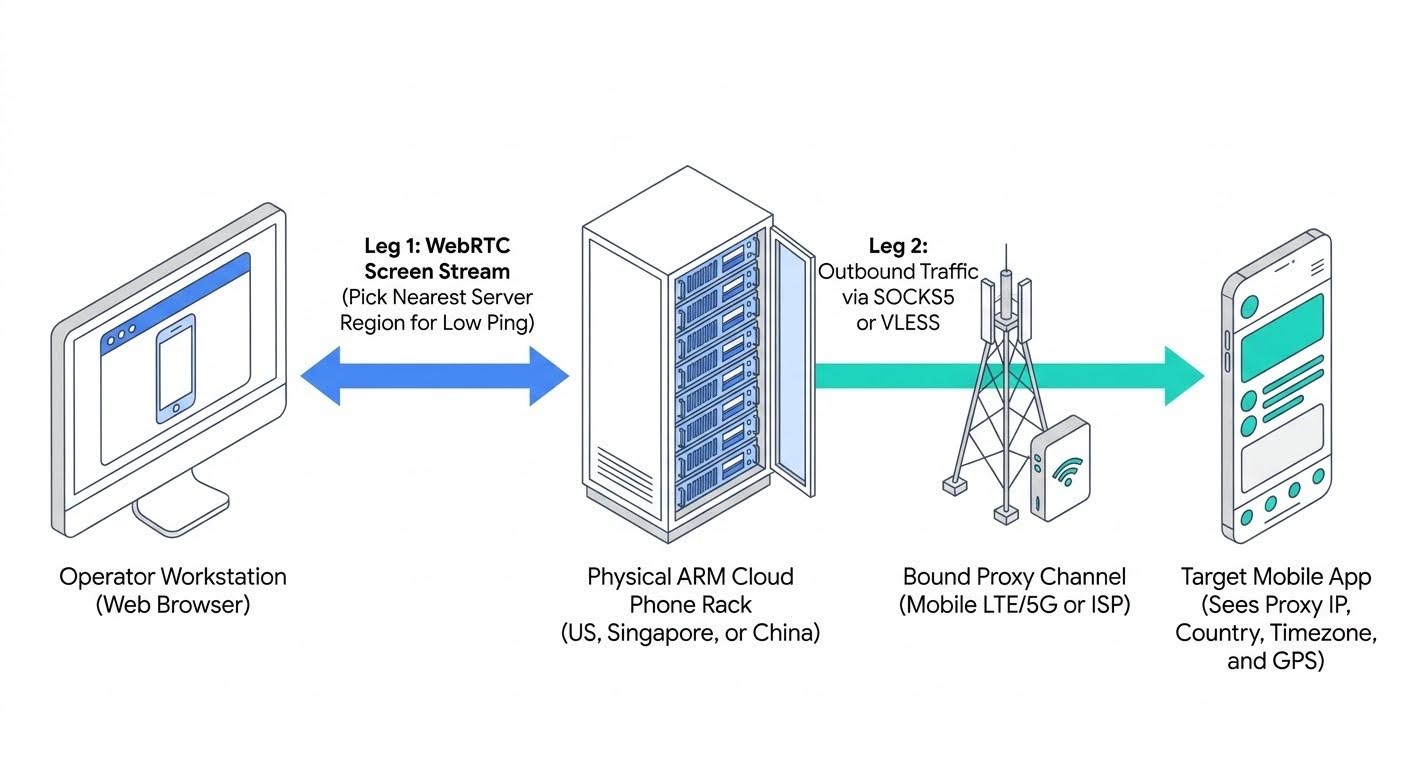
- Hardware vs. proxy location: The server hub hosts the chip, while the bound SOCKS5 proxy sets the external IP, country, timezone, language, and GPS.
- Dedicated vs. shared mobile ports: Resetting the IP via link or API on a dedicated port physically reboots the cellular modem (5 to 10 seconds). Shared ports rotate on a fixed 5 or 30-minute timer and disable manual resets to protect other users.
- VLESS on restricted networks: When a local ISP blocks standard proxy ports, premium mobile channels support VLESS over Xray.
What a cloud phone is and how native ARM hardware differs from emulators
A cloud phone for mobile workflows is not an office VoIP call system. It is a remote Android smartphone hosted on a data center server blade and operated inside a web browser. Instead of plugging handsets into USB hubs and dealing with swollen batteries, you open an isolated profile (Android 10 to 15), and active sessions stay saved when you close your laptop.
Desktop emulators run on x86/x64 PC processors, whereas mobile apps are compiled for ARM architecture.
| Layer | Desktop emulators (x86/x64) | Native ARM cloud phone |
| Processor | Desktop Intel/AMD chips (x86/x64). | Physical ARM server chips (RISC). |
| Execution | Translates ARM code (libhoudini) on the fly. | Direct native execution on ARM silicon. |
| Host load | Heavy local CPU/RAM drain and fan spin-ups. | Lightweight browser video stream. |
| Signals | Exposes x86 bridges and desktop GPU flags. | Real phone parameters and native identifiers. |
On infrastructure platforms like CyberYozh App, each cloud phone runs on physical ARM blades with parameters from 270+ phone models across 12 brands (Samsung, Google Pixel, Xiaomi, OPPO, vivo) matched to their factory Android versions (with optional pre-configured setups).
How hardware server location affects ping and connection stability
Even though the device lives in the cloud, its processor sits on a physical rack in a building. When creating a profile, you select the server region hosting that ARM board: the United States, Singapore, or China.
Controlling a remote phone uses a two-way WebRTC stream: clicks, keystrokes, uploads, and ADB commands travel to the data center, and rendered frames return to your monitor. When an operator in Europe or New York opens a cloud phone hosted in East Asia, every frame crosses thousands of miles of fiber and dozens of autonomous systems (ASNs). Ping climbs past 200 ms, while hop congestion adds jitter (uneven packet arrival) and packet loss, making swipes and audio stutter.
Picking the server hub closest to your workstation keeps that control path short. Operators in North America or Europe get responsive streaming from a US hub, while teams in Southeast Asia get lower ping from Singapore, keeping scrolling smooth and preventing ADB timeouts.
Hardware server location vs. proxy geolocation: two separate jobs
A frequent mistake is picking a distant server region just because a project needs an IP from that country. In a cloud phone workflow, physical hardware hosting and external proxy geolocation handle two separate network legs.
All outbound app traffic exits through the bound SOCKS5 or VLESS proxy (Leg 2), so target apps never see the data center IP of the ARM rack. Enabling Language of IP country and Based on IP geolocation aligns the Android language, clock, and GPS coordinates with the proxy IP. An operator in Southeast Asia can use a Singapore server for low-ping control (Leg 1) while binding a US proxy so the app sees a consistent US phone.
Proxy types for cloud phones and mobile port rotation mechanics
Because Android apps send traffic over TCP and UDP, a cloud phone connects via SOCKS5 proxies. Matching the proxy type to your workflow prevents mid-session logouts.
| Proxy type | Source and billing | Rotation behavior | Typical workflows |
| Dedicated mobile (LTE/5G) | Cellular modems (CGNAT); unlimited traffic. | Manual reset via link/API (5-10s reboot). | Social and ad apps with manual IP control. |
| Shared mobile (LTE/5G) | Cellular carriers (CGNAT); shared traffic. | Fixed 5 or 30 min timer; no manual reset. | Routine browsing and short regional checks. |
| Static residential ISP | Home ISPs; unlimited traffic per fixed IP. | Fixed home IP (99.9% uptime). | Multi-week store portals (Shopify, Amazon). |
| Rotating residential | 100M+ ISP IPs (195+ countries); pay per GB. | Sticky sessions up to 24h; free geo-targeting. | Localization QA, ad checks, city/ISP testing. |
| Datacenter (Dedicated/Shared) | Corporate servers; static IPv4/IPv6. | Fixed IP (99.99% uptime, low ping). | Fast staging tests, QA scripts, and API polling. |
Dedicated vs. shared mobile ports and VLESS support
Mobile LTE/5G proxies fit social apps like TikTok, Instagram, and X because cellular carriers place hundreds of subscribers behind one public IPv4 address via Carrier-Grade NAT (CGNAT).
On a dedicated (private) mobile port, one user controls the modem channel and can reset the IP via link or API. Getting a fresh carrier IP is a physical hardware event: the remote modem disconnects from the cell tower, reboots its radio stack, and re-registers with the network, pausing traffic for 5 to 10 seconds. Triggering resets between tasks avoids upload timeouts.
On a shared mobile port, several users share one modem at a lower cost, and the IP rotates on a fixed 5 or 30-minute timer. Manual resets are disabled because rebooting the modem on demand would cut active sessions for other users on that port.
When a local ISP uses Deep Packet Inspection (DPI) to block standard SOCKS5 or HTTP ports, premium mobile proxies also support VLESS over Xray, wrapping traffic in TLS encryption to pass through restricted networks.
Matching hardware distance and network identity
Stable remote mobile operations rely on matching each layer of your stack to its job. Native ARM cloud phone hardware removes the CPU drag and translation traces of x86 emulators. Picking a server hub near your desk keeps browser control responsive, while pairing each profile with the right SOCKS5 proxy and pre-checking IP reputation gives mobile apps a consistent regional connection.
FAQs about cloud phone hardware location and proxy setup
1. What is the difference between a cloud phone and a desktop Android emulator?
A cloud phone runs Android natively on remote ARM server chips in a data center and streams the screen to your browser. A desktop emulator runs on a local x86 PC processor and translates ARM code in software, using heavy local CPU and RAM.
2. Does the physical server location of a cloud phone change its external IP country?
No. The server region (United States, Singapore, or China) only selects the data center hosting the ARM hardware and sets your control ping. Target apps see the external IP, country, timezone, and GPS of the bound proxy.
3. Why does a dedicated mobile proxy pause for 5 to 10 seconds when changing the IP?
Triggering an IP reset on a dedicated (private) mobile port via link or API makes the physical cellular modem disconnect from the cell tower and reboot its radio stack, taking 5 to 10 seconds.
4. Why is manual IP rotation disabled on shared mobile proxies?
Shared mobile ports are used by several people at once and rotate on a fixed 5 or 30-minute timer. Manual resets are disabled so one user cannot reboot the modem and drop active sessions for others on that port.
5. When should I use VLESS or sticky sessions with a cloud phone?
Use VLESS on premium mobile proxies when your local ISP or firewall blocks standard SOCKS5 or HTTP ports. Use sticky sessions (up to 24 hours) on rotating residential proxies so your IP stays fixed during active logins.

