



Bedtime stories take kids on a journey to moonlit forests, enchanted gardens, and magical worlds, where animals talk. Dreamina AI assists in converting written concepts into animated scenes by utilizing text prompts, reference photos, and background audio options. Its video generation tools let you explore character movements, imaginative settings, and visual storytelling without advanced animation skills. Simple story ideas can become soothing animations that promote curiosity, friendship, and a peaceful ending, with thoughtful planning.
Build a Bedtime Story That Works as an Animated Sequence
A good bedtime movie starts with a theme, like kindness, courage, discovery or friendship. The tools that AI video generator turn the written descriptions into moving pictures, helping to visualise these themes. Begin with an easy character, set him on an easy objective, add a small challenge, and end with reassurance. For example, a little firefly searching for somewhere to rest might discover a sheltered garden. Break the story down into scenes with a main action, e.g. find a glowing flower, follow the sparkly lights. Slow transitions, limited movement, and simple compositions hold attention without causing unwanted excitement. A quiet story can be riveting with little or no conflict.
Design Storybook Characters, Settings, and Visual Language
Good visual direction creates a sense of continuity in animated storybooks, and not a motley collection of clips. Explain the color, clothes, shape, face, and other unique accessories that each character will have before creating scenes. Recurring appearances can be done with the help of reference images, but it is still necessary to review all the clips. Pick a drawing technique that you can stick with, whether it’s watercolor landscapes, paper-cut art, soft 3D animation, or hand-drawn fantasy. Moonlit meadows, cozy cottages, underwater castles, and cloud kingdoms provide unique storytelling opportunities. Match lighting and colour schemes to the emotions of each scene. Soft blues and delicate purples can create soothing nighttime ambiance, while warm window lighting can give a sense of security. Carefully script narration, ambient sounds, dialogue of characters, and background music. While Dreamina AI can handle creative audiovisual tasks, audio adjustments can be made separately to ensure the narration and audio are in sync with the final video.
How to create animated bedtime storybooks with Dreamina AI text-to-video maker
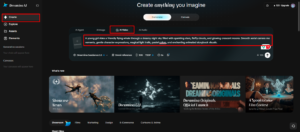
Step 1: Access Dreamina AI and write your story prompt
- Sign up or log in to Dreamina first to turn bedtime ideas into animated videos.
- Select the “Create” tab from the left menu and then tap the “AI video” option.
- Later, enter a detailed text prompt on how your storybook video should look and feel. Add details about video elements, sound, background, theme, and concept, like sleepy foxes and moonlight.
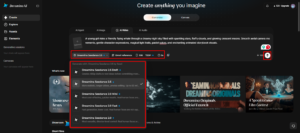
Step 2: Choose a model, set the page format, and generate
- After that, choose a model from the options at the bottom of the dialogue box.
- You can choose Dreamina Seedance 2.5, Dreamina Seedance 2.0, or Dreamina Seedance 2.0 Fast models. Dreamina Seedance 2.0 Mini, Dreamina Seedance 1.0, and similar options also suit storybook scenes well.
- Click “Omni reference” to guide the AI with multiple character reference images for accurate results.
- Select the custom aspect ratio and resolution from the “Aspect ratio” and “Resolution” tabs below.
- Finally, click the “Generate” tab and watch the AI begin creating your bedtime story video.
Step 3: Refine your storybook and export
- If the story feels off, click “Edit prompt” or “Regenerate” to refine the results.
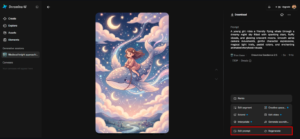
- You can edit the generated story video using the “Edit video” option for softer scenes.
- Moreover, you can use “Edit segment” to edit only one scene of the story video.
- Use “Extend video” to lengthen the dreamy adventure and add a calmer ending for children. Apply “Creative upscale” to improve your video quality and brighten every little storybook illustration detail.
- Dreamina gives you complete freedom to edit your storybook video exactly the way you like.
- Finally, click the “Download” tab present in the top right corner of the Dreamina interface. This saves the storybook video file on your local device for easy bedtime viewing anywhere.
Six Storybook Ingredients That Give Bedtime Animations Personality
- A Gentle Animal Hero: Introduce an expressive rabbit, fox, or bear with a recognizable color palette and simple goal.
- An Enchanted Nightscape: Create moonlit hills, softly illuminated clouds, and distant castles using restrained lighting.
- A Magical Discovery: Include a small star, singing flower, or secret entrance that leads to a discovery that doesn’t surprise and frighten.
- A Reassuring Companion: Add a friendly owl, gentle dragon, or woodland spirit that demonstrates kindness through its actions.
- A Journey Home: Show the character in the familiar surroundings moving towards a safe resting place.
- A Peaceful Final Image: Have a sleeping character, a glowing window, or fading stars, and leave the ending moment to linger.
Turn Individual AI Clips Into a Cohesive Animated Storybook
Write out the opening, discovery, journey, turning point, and resolution before coming up with individual scenes. Clips should be used to further the story, not for decoration that doesn’t fit into it. Use consistent character description (clothes, proportions, colors, accessories, etc.) and reuse references as appropriate. Check created footage for any unwanted scene changes. Link clips with soft transitions, dissolves, matching motion, or similar elements like floating leaves and glowing stars. Important actions can be made clear by narration, and soft music and ambient noises can set the atmosphere. Allow for some moments of silence, so that children can take in meaningful visual moments. Use titles or short closing messages in the editing process when it is necessary to have exact spelling and positioning.
Keep Bedtime AI Animations Age-Appropriate and Thoughtfully Made
Select appropriate conflicts, calming resolutions, and suitable imagery for the audience. When making bedtime content, steer clear of surprising noises, abrupt cuts, or scary images. Ensure that magical features are clearly a part of the fictional story, especially if the magical elements involve encountering animals that are magical or impossible landscapes. If the animation contains educational content on astronomy, wildlife, or nature, check the facts on their own. Check the narrative flow, dialogue clarity, audio levels, visual artifacts, and ending before sharing. The pictures can not guarantee a relaxing experience; a careful review helps maintain the emotional tone that was intended.
Conclusion
Dreamina AI offers creative tools to transform nighttime ideas into animated scenes from storybooks—clear visual storytelling with thoughtful prompts, familiar characters, consistent art direction, and gentle pacing. The overall narration and sound effects are well planned, which further helps in creating an atmosphere. Continuity, age appropriateness, and scene transitions can be checked, and imaginative animation can be created with meaningful beginnings and peaceful ends. The technology is used to facilitate the creative process; decisions around storytelling remain key to the finished experience.

