


Your team starts the day with plans to get real work done. Then the small tasks pile up. Someone copies new leads into a sheet. Another person sends booking reminders. A manager spends an hour chasing updates. An ai automation agency can help connect these steps so your staff spend less time moving data and more time helping customers.
But where should you start? Trying to automate every task at once can turn a useful project into a costly mess. A better first step is to find one job that repeats often, has clear rules, and is easy to check.
This guide covers the business workflows worth looking at first, what each one can do, and how to tell if the change helps.
What Is AI Workflow Automation?
A workflow is a set of steps used to finish a job. Think about a new customer booking a call. Their details arrive through a form. Someone adds them to a contact list, books a time, and sends a reminder.
Automation links those steps so they can happen with less manual work.
AI can help when a step involves reading or sorting information. For example, it might read a customer message and suggest which team should handle it.
Yet many steps need no AI at all. Sending a reminder the day before a call can follow a fixed rule.
The useful question is simple: what does this task need? Use clear rules for fixed steps. Add AI where it helps handle varied text or documents.
How Do You Choose What to Automate First?
Start with the work your team keeps putting off because it is dull, slow, or easy to forget.
Ask staff to track repeated tasks for one week. Write down how often each task happens, how long it takes, and what tends to go wrong.
Then check five things:
- Volume: Does the task happen often enough to matter?
- Clarity: Can someone explain the steps?
- Inputs: Is the needed information easy to find?
- Review: Can a person spot and fix a mistake?
- Value: Will the change free up time or improve service?
A task that takes ten minutes each day may be a better starting point than a large process used twice a year.
Also, look for delays between teams. Perhaps sales closes a deal, but the service team hears about it days later. An alert and a shared task list may solve that gap.
Before building anything, remove steps that serve no purpose. There is little value in making needless work happen faster.
Planning Your First Automation Project With deventity
A useful brief should explain the problem before naming any tools.
For example: “Our sales team checks three inboxes for new leads. Some messages sit there until the next day. We need each lead saved, assigned, and flagged for follow-up.”
That gives a service provider a clear job to assess. Dev Entity lists workflow planning, system links, and ongoing support among its automation services.
When discussing a project, ask who will test the workflow, handle errors, and keep it working after launch. Also ask what your staff will need to review.
Agree on one main goal, such as reducing missed inquiries. A clear goal makes it easier to judge the finished system.
1. New Lead Capture and Follow-Up
A new inquiry can arrive through a website, email, or social channel. If each source needs a separate check, leads can slip through the cracks.
Start by bringing those inquiries into one shared place.
A basic workflow could:
- Save the person’s name and contact details.
- Check whether their record already exists.
- Send a brief receipt message.
- Assign the inquiry to a staff member.
- Create a follow-up task.
AI could help sort a free-text message by service type. A request for website help, for instance, could go to the web team.
Keep the first reply honest. Confirm that the message arrived without making promises about prices or delivery dates.
What to measure: Time to first useful reply, unassigned leads, and missed follow-ups.
2. Customer Support Message Sorting
Support teams often answer the same kinds of questions. Customers ask about orders, account access, returns, and booking changes.
Before trying to automate full replies, start with sorting.
A workflow can read incoming messages, suggest a topic, and place each one in the right queue. It can also draft a reply using approved help pages.
For example, a message about a missing parcel could go to the order team with the order details attached.
Give customers a clear route to a person. A message that includes several problems may need more care than a simple label can provide.
During the first test, let staff review the suggested labels and drafts. Their corrections will show where the setup needs work.
What to measure: Wrongly routed messages, time spent sorting, and cases that need repeated contact.
3. Contact Records and Data Entry
Copying details between tools feels like a small job until several people do it all day.
A salesperson takes notes after a call. Later, someone copies them into the customer record. A third person adds the next task. Each handoff creates another chance to miss a detail.
Automation can move selected information between these tools.
AI may help turn rough notes into a short summary. Fixed rules can place confirmed details into the right fields.
Keep a link to the source notes so staff can check them. If the notes do not mention a budget, leave that field blank rather than asking AI to guess.
Take care with records that look alike. Two people with the same name should not be merged without a reliable match.
What to measure: Time spent updating records, missing fields, and duplicate contacts.
4. Appointment Booking and Reminders
Booking a meeting should not take six emails.
A booking workflow can show open times, save the chosen slot, and send a clear confirmation. It can also share a short form so staff know what the meeting is about.
Useful steps include:
- Sending the meeting link and time zone.
- Adding a reminder before the call.
- Offering a way to cancel or move the booking.
- Notifying the assigned staff member.
- Creating a task after the meeting.
Most of this can run on fixed rules. AI is more useful for turning a long booking note into a short brief.
Test schedule changes with care. If someone moves a call, the old reminder should stop.
What to measure: Booking admin time, missed meetings, and calendar errors.
5. New Customer Onboarding
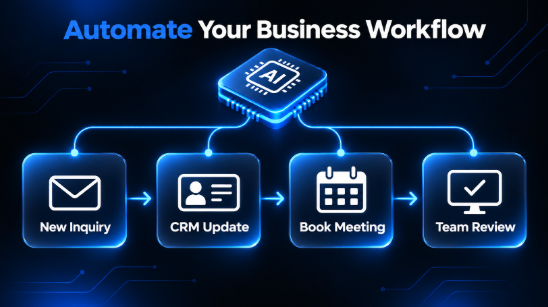
A signed deal should lead to a clear next step. Too often, the welcome email waits while staff set up folders, chase files, and work out who owns the account.
Build a workflow that starts when a deal reaches an approved stage.
It could create a project folder, send a welcome message, assign an account owner, and request the files needed to begin.
Use a short checklist that both the team and customer can follow. Show what is complete and what is still missing.
AI could review a project brief and draft a summary for the team. A staff member should confirm the scope before work begins.
Avoid sending customers requests for details they already gave during sales. Good onboarding should feel joined up.
What to measure: Time from sale to kickoff, missing items, and repeated requests for information.
6. Invoice Details and Payment Reminders
Invoice admin includes several small steps that are easy to delay.
A workflow can collect invoice files, pull out key fields, and send them to a review queue. Those fields might include the supplier name, invoice number, date, and total.
Set checks for missing details, repeated invoice numbers, and totals that do not match.
Keep payment approval as a separate step. Reading an invoice and deciding to pay it are different jobs.
For outgoing invoices, reminders can follow approved rules. Make sure the workflow checks the latest payment status before sending a message.
A customer who has already paid should not receive a late notice because two systems failed to sync.
What to measure: Processing time, reminder errors, and invoices waiting for review.
7. Weekly Reports and Team Updates
A weekly report can take hours when the data sits in several places.
Someone downloads sales figures. Another person checks support numbers. A manager gathers project updates and builds a summary.
Automation can collect agreed figures and place them into a set report format. AI can then draft a short note about changes that deserve a closer look.
Keep the numbers tied to their source. Staff should be able to check where each total came from and which dates it covers.
Ask AI to describe changes without inventing causes. A drop in sales does not prove that a recent price change caused it.
Let the report flag a question for the team to explore.
What to measure: Report preparation time, missing data, and corrections made before sharing.
8. Internal Requests and Task Handoffs
Small internal requests can create long message chains.
An employee asks for access to a tool. A manager approves it, but the request never reaches the person who can set up the account.
A shared request form can start a clear workflow. It can collect the needed details, send the request for approval, and create a task for the right team.
AI can help sort requests written in plain language. Clear rules should control who may approve them.
Give every request an owner and status. Staff should know whether it is waiting, approved, or complete.
This also makes delays easier to find. You may learn that one approval step holds up most requests.
What to measure: Completion time, lost requests, and tasks waiting without an owner.
How to Run a Small First Test
Choose one workflow and one team. Keep the first version narrow enough that people can understand what it does.
Record the current process
Watch the task happen. Note the normal steps and the odd cases.
If a customer sends the same form twice, what should happen? If a file is missing, who should hear about it?
Use these cases when testing.
Build a review stage
At first, let the system prepare work for a person to check. That might mean drafting a reply, suggesting a label, or filling an invoice review form.
Record what staff change and why.
Test failure cases
Check more than the easy path. Try incomplete forms, repeated messages, unreadable files, and a failed connection.
The workflow should alert an owner when it cannot finish.
Review the result
After a useful sample of real tasks, compare the new process with the old one.
Ask staff whether the workflow saves effort. If they spend just as long fixing its output, the design needs another pass.
How to Tell Whether Automation Pays Off
Time saved is useful, but it needs context.
Suppose a task takes eight minutes and happens 150 times a month. That adds up to 20 hours.
If automation cuts the work to three minutes per task, the remaining work takes 7.5 hours. The potential saving is 12.5 hours.
This is an example, not a promised result.
Next, count the full cost. Include setup, monthly tools, usage fees, staff review, and upkeep. A workflow that looks cheap may need more attention than expected.
Also check service quality. Faster handling helps only if the work stays accurate.
Set a review date before launch. Decide what result would justify keeping, changing, or stopping the workflow.
Remember that saved time creates capacity. It becomes a cash saving only when it changes actual costs.
Common Mistakes to Avoid
Starting with too many tasks. When several workflows change at once, it becomes hard to tell what caused a problem.
Using unclear source data. Fix old records and missing fields before relying on them.
Skipping staff input. The people doing the task know the cases that a process chart can miss.
Leaving no owner. Someone needs to review failures, update rules, and answer staff questions.
Adding AI to every step. A simple rule may be easier to check and maintain.
Measuring only speed. Track errors and customer experience as well. A fast reply that creates more work is a poor result.
Frequently Asked Questions
What is the best business workflow to automate first?
Choose a frequent task with clear steps and an easy review process. Lead capture, booking reminders, and internal request routing are useful candidates to assess.
Does every workflow need AI?
No. Fixed tasks often work well with standard automation. AI can help when a step involves varied text, such as reading messages or drafting summaries.
Can small businesses start with one workflow?
Yes. One focused workflow gives a small team a chance to learn, measure the result, and decide what to do next.
How long does setup take?
It depends on the tools, data, and steps involved. A simple reminder flow needs less work than a process linking several systems. Set a timeline after reviewing the actual task.
Start With One Task Your Team Wants Fixed
Ask your team one question: “Which repeated task gets in your way each week?”
Use their answers to choose a small, clear starting point. Map the steps, record the current effort, and test a workflow with room for human review.
Once it works reliably, build on what you learned. Each project should make daily work easier to finish and easier to manage.

