



Are you troubled by the annoying ads while browsing the web? Some ad-injecting extensions may display excessive advertisements, change your search settings, redirect you to unfamiliar websites, or collect browsing information without clear permission. Risky plugins can also slow your browser and create security risks. Fortunately, a reliable Windows utility like IObit Uninstaller can help you identify and remove these unwanted programs more easily. In this guide, we will provide everything about IObit Uninstaller, including its key features, benefits, and how to use it to keep your Windows PC cleaner, safer, and running smoothly.
Part 1: Why Should You Remove Unwanted Browser Plugins?
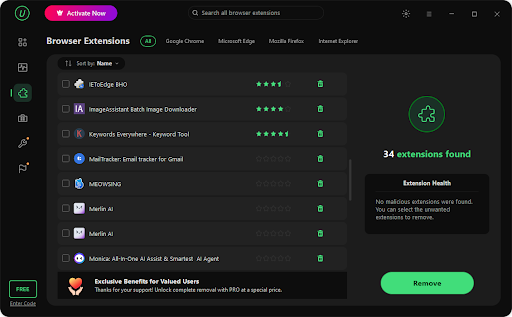
So why should you remove browser plugins from Chrome or any other browser? While browser plugins and extensions can add useful features, unnecessary or risky ones can negatively affect your browsing experience. Here are some key reasons:
- Faster Speed & Better Experience: Removing risky browser plugins can make websites load 2X to 5X faster by reducing unnecessary extensions running in the background.
- Protect Your Data: Some browser plugins collect your browsing activity, search queries, or other information through their permissions and tracking technologies.
- Prevent Unwanted Ads: Unwanted ads and pop-ups are one of the most irritating things to face while browsing, and browser plugins can be the main culprit behind them.
- Free Up System Resources: Unused plugins may continue running in the background, so removing them can reduce unnecessary resource usage.
Part 2: What is IObit Uninstaller?
IObit Uninstaller is an uninstaller for Windows designed to help users remove unwanted programs, applications, browser extensions, and other software from their computers. Unlike the standard uninstaller for Windows, it provides additional options for finding leftover files, folders, and registry entries after an application is removed. The tool can also help identify unwanted browser plugins and extensions that may inject advertisements, modify browser settings, or negatively affect the browsing experience. Its straightforward interface makes it suitable for beginners who want an easier way to manage installed software without manually searching for leftover files. In addition to uninstalling unwanted programs, IObit Uninstaller offers features for software management, such as Software Updater, Install Monitor, and more.
Part 3: Key Features of IObit Uninstaller for Removing Risky Plugins
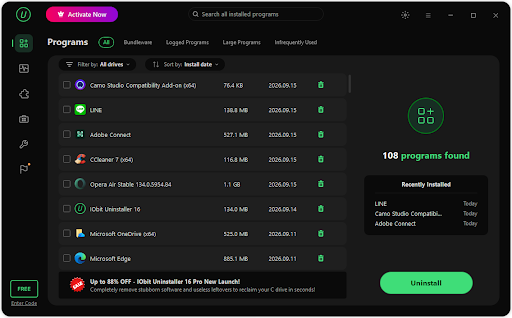
The program offers a wide range of features that can make it easier to manage unwanted applications and browser plugins on a Windows PC. Here are some of its key features:
- Browser Extension Removal: Looking for a tool to remove unwanted browser extensions? Look no further! IObit Uninstaller can help users remove unwanted browser extensions and plugins from their Windows computers. It allows users to review installed extensions and identify add-ons they no longer need.
- Uninstall Unwanted Programs: With the help of this tool, users can easily remove unwanted programs with a single click — no technical knowledge required. After the main uninstallation, the tool can also scan for leftover files, such as registry entries, folder files, and more.
- Batch Uninstallation: IObit Uninstaller enables users to remove multiple unwanted programs simultaneously, making the process less time-consuming compared to traditional methods. Simply select the programs you want to remove and click on the “Uninstall” button to begin the process.
- Multiple Tools: The program offers more than just a basic uninstall feature. It combines several software management tools in one place, allowing users to remove unwanted programs, manage browser extensions, scan for leftover files, and keep track of installed applications.
- Intuitive Interface: One of the biggest advantages of IObit Uninstaller is that it offers an easy-to-use interface, allowing users to remove ad-injecting and risky browser plugins with a single click. The program requires no professional help or technical knowledge to uninstall programs.
Part 4: How to Remove Ad-Injecting and Risky Browser Plugins Using IObit Uninstaller
IObit Uninstaller enables users to remove ad-injecting and risky browser plugins with a single click. Here is how to do it:
- Navigate to the IObit Uninstaller official site and download the latest version of the program to your PC. Once installed, launch it and choose the “Browser Extension” option from the left panel.
- The program will display all the available browser extensions on your system. Locate the extension you want to remove. The program supports batch uninstallation, so users can select multiple browser extensions simultaneously.
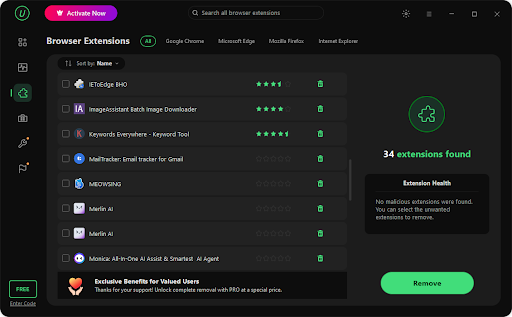
- After selecting the browser extension, click the “Remove” button available on the right side. The program will begin the uninstallation process and, within seconds, remove unwanted and ad-injecting browser plugins from your device.

Conclusion
If your browser is loaded with unwanted ads and pop-ups, then it may be time to review and remove unnecessary browser extensions. Ad-injecting and risky plugins can affect your browsing experience, consume system resources, and create privacy concerns. Fortunately, IObit Uninstallers provides a smart way to manage and remove unwanted browser extensions and programs from a Windows PC.

