


Artificial intelligence has made it easier to create first drafts, but turning those drafts into finished documents still takes work. An AI tool might generate a report, a student might prepare notes with an AI assistant, or a writer might use a local language model to organize ideas. In each case, the content needs to be checked, edited, and formatted before it is ready to share.
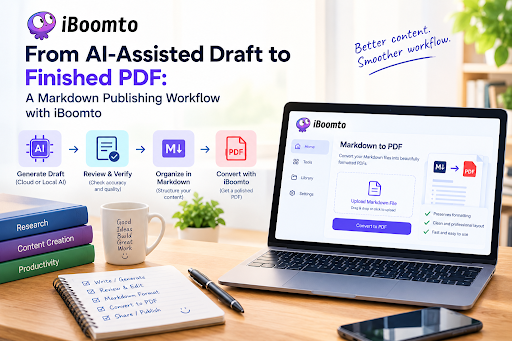
A practical workflow can make this process easier. You can use AI to prepare an initial draft, review the information for accuracy, organize the approved content in Markdown, and then convert it into a PDF. Visit iboomto.com to use its online Markdown to PDF converter, which turns structured text into a document that is easier to distribute, read, and print.
Start With an AI-Assisted Draft
AI-generated content can be a useful starting point for reports, guides, study notes, project documentation, and other written materials. Cloud-based AI services can help generate content through a browser, while locally run AI tools allow users to work with models installed on their own computers.
The best approach is to treat the result as a draft rather than a finished document. AI-generated text can contain incorrect facts, outdated details, repeated points, or statements that sound confident but lack supporting evidence.
Before moving to formatting, read the draft carefully. Check names, dates, figures, quotations, and technical claims against reliable sources. If the document refers to research or external information, verify that the cited material actually supports the statements being made.
This review stage is important whether the content comes from a cloud-based assistant or a model running locally. The method of generating the text does not remove the need for human judgment.
Review and Verify Before Publishing
Once the initial draft is ready, focus on accuracy, clarity, and purpose. Ask whether the document answers the reader’s main question and whether each section contributes something useful.
Remove repeated explanations and replace vague statements with specific information where possible. Check whether technical terms are used correctly and whether the language suits the intended audience. For a student report, this may mean explaining difficult concepts clearly. For a business document, it may mean confirming figures and making recommendations easy to understand.
You should also check that AI-generated references are genuine. Do not assume a link, quotation, statistic, or research paper is correct simply because an AI tool included it.
A final human review helps make the content more reliable and gives the writer control over what will be published.
Organize the Approved Content in Markdown
After reviewing the draft, Markdown provides a simple way to organize the content before converting it into a finished document.
The results suggest the next steps.This format is easy to read and edit without needing a full word processor. It also makes the document structure visible in the source file, which can be useful when preparing long reports or technical documentation.
Markdown works well for AI-assisted workflows because you can revise the generated text, rearrange sections, add links, and organize information before creating the final PDF.
Keep headings consistent, use lists when they make information easier to scan, and check that links point to the correct sources. If the document includes tables or code blocks, review those sections carefully because they may need additional formatting attention in the final output.
Convert Markdown Into a Finished PDF With iBoomto
Once the content has been checked and organized, the next step is creating a shareable document.
The iBoomto Markdown to PDF Converter is an online tool designed to turn Markdown files into formatted PDFs. Its website describes features intended to preserve document structure and maintain consistent styling across pages.
The process is straightforward:
- Prepare and save your approved content as a Markdown file.
- Open the iBoomto Markdown to PDF converter.
- Upload the Markdown file according to the tool’s instructions.
- Convert the file and review the generated PDF.
- Check the layout before sharing or publishing it.
This workflow can save time compared with manually copying the text into a word processor and rebuilding every heading and list.
However, conversion should not be treated as the final quality check. Open the resulting PDF and review page breaks, headings, links, tables, and any special formatting. Make sure that important content has not been cut off and that the document remains easy to read on a screen or on paper.
Who Can Benefit From This Workflow?
This approach can help anyone who regularly turns written information into documents.
Students can use AI-assisted drafting to organize study notes or outline a report, verify the information, and convert the approved Markdown into a PDF for reading or sharing.
Knowledge workers can use the same process for internal guides, meeting summaries, project updates, and research documents. Preparing the structure in Markdown makes revisions easier before the document is distributed.
Developers and technical writers may find the workflow useful for README files, software documentation, setup instructions, and project guides. Markdown is already common in these areas, so converting the final version to PDF provides another format for clients, colleagues, or non-technical readers.
Freelancers and small businesses can use it to prepare proposals, process guides, and informational documents without spending as much time rebuilding layouts manually.
The main benefit is the separation of tasks: AI helps with drafting, the writer checks the content, Markdown organizes it, and the converter prepares a shareable file.
Understand Privacy Before Uploading Files
Privacy deserves attention whenever documents are processed online. An online converter requires users to upload files to a web service for processing. That is different from simply editing a file on a computer without sending it to an online service.
Before uploading a document, consider what it contains. Public information, general study notes, and non-sensitive documentation may be suitable for an online workflow. Confidential business reports, personal records, unpublished research, or documents containing client information may require additional care.
Review the service’s privacy policy and file-handling practices before uploading sensitive material. Check how files are processed, whether they are retained, and what protections are described. If your employer, client, or educational institution has rules about external services, follow those requirements.
iBoomto provides information about its document tools and security practices on its website, but users should review the current terms and privacy details themselves before processing files that require a high level of confidentiality.
Where documents must remain on a local device, consider an appropriate offline workflow rather than assuming an online converter meets that requirement.
Final Thoughts
Creating a finished PDF from AI-assisted content does not need to be complicated. A reliable process starts with a draft, checks the facts, improves the writing, organizes the approved material in Markdown, and then converts it into a document that is ready to share.
The iBoomto Markdown to PDF Converter can help with that final conversion step, reducing the need to rebuild document formatting manually.
The most important part of the workflow remains human review. AI can help produce a first draft, but checking facts, improving clarity, and deciding what belongs in the final document are still essential. With those checks in place, Markdown and PDF conversion can provide a straightforward way to move from an AI-assisted draft to a finished document.

