



A Snapchat Story Viewer makes a simple promise. You type a username and can watch that person’s Story without your name appearing in their viewer list. Snapchat’s own Help Center is clear about tools like this. Using unauthorized third-party apps or plugins breaks its Terms of Service, and your account may get locked. Snapchat also says its support team will not unlock an account locked for this reason.
That account risk is only the start. Many fake social media viewer sites are not built to show you anything. They are built to collect your login details, flood you with ads, or install software on the device you used to open them.
Below, you will learn why the promise itself is the main warning sign, the 9 red flags to watch for, a 60-second check you can run before you click, and exactly what to do if you already did.
Key Takeaways
- If the official app cannot do it, a free website cannot do it safely.
- No viewer tool needs your password to show public content.
- A “verify you are human” page that asks you to press keys or paste text is malware.
- A store badge and good reviews do not prove an extension is safe.
- Allowing notifications from a viewer site can lead to scam pop-ups later.
- Your recovery steps depend on how far you went on the site.
Why Viewer Sites Are Such Good Bait
People turn to fake social media viewer sites for ordinary reasons. You may be curious about an ex, worried about a child, or checking up on a rival business. Each reason comes with a wish to stay hidden. That wish makes you more likely to ignore warning signs.
The Promise Is the Problem
Social platforms show creators who viewed their Stories. That is a feature, not a flaw. The platform records every view on its own servers. An outside website cannot reach into those servers and remove your name from the list.
So when a site says it can, it is claiming access the platform does not give outsiders. There are only two ways that claim can be “true”:
- The site shows public content you could already see another way.
- The site violates the platform’s rules, often by logging in with real accounts, putting any account it touches at risk.
Most of the time, neither is happening. The site shows a fake loading screen and then asks you for something.
The master rule: if the official app cannot do it, do not trust a free website that says it can.
What the Operators Really Want
Fake social media viewer sites earn money in four main ways.
- Your login details. A working username and password can be sold or used to spread more scams from your account.
- Ad money. Forced redirects and pop-ups pay-per-view.
- Offer commissions. Every survey you fill in or app you install, can pay the operator a fee.
- Access to your device. Extensions, downloads, and pasted commands can install infostealer malware that takes saved passwords, cookies, and payment details.
Knowing the business model helps you spot the trap. The site always needs you to do something before you see anything.
9 Red Flags of Fake Social Media Viewer Sites
The red flags below range from the mildest to the most dangerous. Stop at the first one you see. You do not need to see all nine to know a site is unsafe.
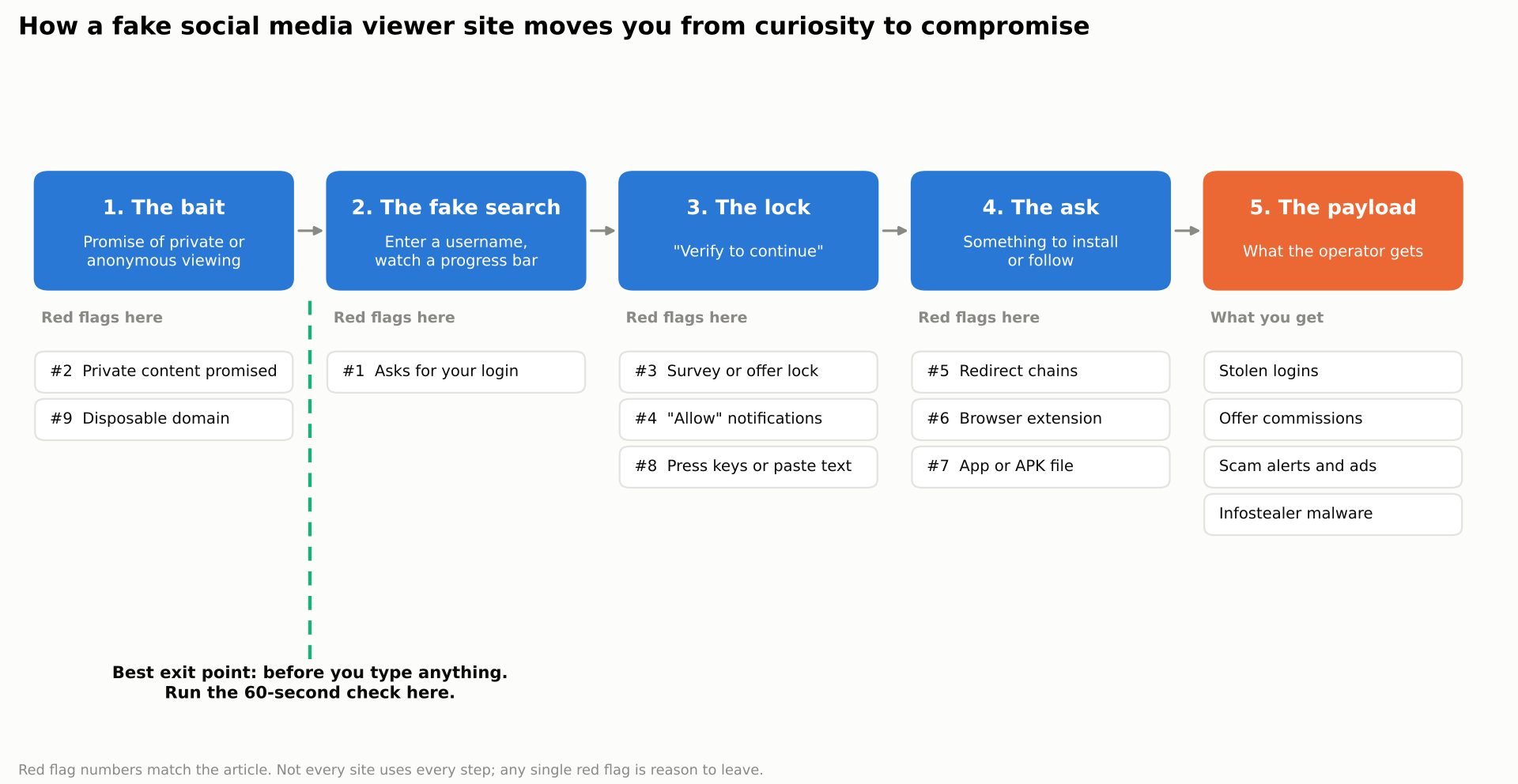
Flow diagram showing the typical path through a fake social media viewer site, from the bait page to the request and the payload, with each red flag marked at the step where it appears and the safe exit point
Red Flag 1: It Asks for Your Login
No tool needs your password to show content that is already public. A request for your username and password is the clearest sign of a phishing page. Snapchat notes that unauthorized apps request your login credentials directly, while approved apps connect securely without seeing your password. Instagram’s Help Center also warns users not to use apps that offer likes and followers.
If a site asks you to sign in with your social account, close it.
Red Flag 2: It Promises Private Content
Private accounts are private by design. Only approved followers can see their posts and Stories. Any site that says it can show private content is either lying or breaking the platform’s systems.
The same applies to reposts. A TikTok repost viewer that claims to show the reposts of a private account is promising something TikTok’s privacy controls are built to stop. TikTok also offers users settings to control who can see their reposts. A website that says it can skip those settings is not a viewer. It is bait.
Other claims in this group include “see who viewed your profile” and “see deleted Stories.” Treat them all the same way.
Red Flag 3: The “Human Verification” Content Lock
You enter a username. A progress bar loads. Then a box appears: “Verify you are human to unlock results.” It asks you to complete a survey, install an app, or sign up for an offer.
The results never appear. Each task you complete earns the operator a commission, and some offers sign you up for paid services. This story viewer scam has run on fake social media viewer sites for over a decade. It still works because the progress bar makes the results feel close.
Red Flag 4: It Asks to Send You Notifications
A pop-up says “Click Allow to continue” or “Click Allow to confirm you are not a robot.” This is not a security check. It is a browser permission request.
If you click Allow, the site can send notifications to your screen even after you close it. Those alerts often look like system warnings, such as “Your phone has 3 viruses.” They push you toward fake cleaner apps and more scams. You can remove the permission at any time in Chrome’s notification settings.
Red Flag 5: Redirect Chains and Fake Virus Alerts
You click one button and land three sites away. New tabs open by themselves. A full-screen page flashes a warning with a countdown timer.
These chains are how the site sells your visit to the next bidder. You lose control of where you end up. Close the browser tab, or the whole browser if it will not close. Never call a phone number shown on a warning page.
Red Flag 6: It Pushes a Browser Extension
Some fake social media viewer sites tell you to install an extension “for faster viewing” or “to download Stories.” A malicious browser extension can read pages you visit, track you across sessions and, in some cases, capture what you type.
A 2026 case shows why store listings are not enough. In April 2026, Thailand’s national CERT reported on a campaign of fake TikTok downloader extensions for Chrome and Edge that had reached more than 130,000 users. The extensions behaved normally for 6 to 12 months. Some even earned “Featured” badges in the stores. Only then did they start taking commands from outside servers.
The lesson is simple. A badge, a high rating, and good reviews tell you how an extension behaved in the past. They do not tell you what it will do next month.
Red Flag 7: It Wants You to Install an App or APK
On Android, fake social media viewer sites may offer a “viewer app” for direct download as an APK file. To install it, your phone asks you to allow installs from unknown sources. That warning exists for a reason.
Apps from outside official stores skip the store’s malware checks. A viewer app can ask for access to your notifications, contacts, or accessibility settings. With accessibility access, an app can read your screen and act on your behalf.
If a site needs you to change a security setting to use it, do not continue.
Red Flag 8: A Fake CAPTCHA Asks You to Press Keys or Paste Something
This is the most dangerous trap on the list, and it is spreading fast.
The page looks like a normal “verify you are human” check. But instead of a checkbox, it gives you steps. Press the Windows key and R. Press Ctrl+V. Press Enter. On a Mac, it may ask you to open Terminal and paste a line.
Those steps run a command that the page secretly copied to your clipboard. The command downloads malware. Security teams call this technique ClickFix. New Zealand’s national cyber security service warned about it in September 2026, noting that real verification checks are built into the page and use simple puzzles or checkboxes.
The same trick appears beyond websites. In 2026, researchers at ReversingLabs found TikTok and Instagram Reels videos that told viewers to open PowerShell and run a command, which were presented as software tips. The command installed Vidar, a malware family that steals passwords, payment data, and login tokens.
Remember this rule. No real CAPTCHA will ever ask you to open a Run box, Terminal, or PowerShell.
Red Flag 9: The Domain and Page Look Disposable
Fake social media viewer sites are built to be replaced. When one domain gets blocked, a lookalike takes its place. Watch for these signs:
- The domain is only weeks or months old.
- The name mixes platform words with extra letters or numbers.
- There is no company name, address, or real contact page.
- The privacy policy is generic or copied from another site.
- Ads cover more of the page than the tool itself.
One of these alone may not mean much. Three or more together usually do.
The 60-Second Safety Check
You can run this check before you type a single username. It takes about a minute and catches most fake social media viewer sites.
Five Quick Tests
- Ask whether the official app offers this. If the platform does not let you do it, stop here.
- Check the site’s status. Paste the address into Google’s Safe Browsing site status tool. A warning means leave. A clean result does not prove the site is safe because new domains may not yet be flagged.
- Check the domain’s age. Use a WHOIS lookup. A site created last month that claims years of service is lying.
- Read every browser prompt. Before you click Allow, read what the browser is asking for. Notifications, downloads, and extensions are all red flags here.
- Never sign in. If you test a site at all, use a private window and do not enter any login details.
Real vs. Fake Claims
Some viewing options are real and come from the platforms themselves. Others are only promises. The table below sorts common claims so you can tell them apart quickly.
| Claim | Real or fake? | Why |
|---|---|---|
| View a public profile in the official app or website | Real | The platform shows public content to everyone |
| Watch a private Story without being seen | Fake | Only approved followers can see private Stories |
| See a private account’s reposts | Fake | Private activity is limited to approved followers |
| See who viewed your profile | Fake on most platforms | Most platforms do not share this data |
| Recover deleted Stories from another person | Fake | Deleted content is not available to outside sites |
| Download your own content | Real | Use the platform’s own data download tool |
Already Clicked? What to Do Based on What You Did
Do not panic. The right fix depends on how far you went on the site. Find the row that matches what you did, then follow it in order.
Recovery Steps by Action
The table below lists each action from least to most serious, along with the corresponding steps.
| What you did | What to do now |
|---|---|
| Only visited the page | Close the tab. Clear that site’s data in your browser settings. |
| Allowed notifications | Remove the site’s notification permission. Clear its site data. |
| Entered your social media password | Change the password now. Turn on two-step verification. Check your login activity and log out of other sessions. |
| Installed a browser extension | Remove it fully, not just disable it. Change passwords for email and banking first, then other accounts. |
| Installed an app or APK | Uninstall it. Turn off “install unknown apps” again. Run a trusted security scan. |
| Pressed keys or pasted a command | Disconnect from the internet. Scan the device. Change your passwords from a different, clean device. |
The last row needs extra care. Infostealer malware can copy saved passwords and active login sessions in seconds. If you change passwords on the infected device, the malware may capture the new ones too. That is why a second, clean device matters.
For more help removing unwanted software, follow Google Chrome’s malware removal guide.
If Your Snapchat Account Gets Locked
Snapchat lists third-party apps and plugins as one reason an account can be locked. For a temporary lock of this kind, Snapchat says to wait out the lock period, remove the unauthorized apps or plugins, update Snapchat, and then log back in.
Snapchat also warns against scammers who claim they can unlock accounts. This is a second trap that often follows the first. Someone offers to “fix” your locked account for a fee, then takes the money or your login. Only use Snapchat’s own in-app and website tools.
When to Get Professional Help
Contact an IT professional or your bank if any of these apply:
- You used a work device or a work browser profile.
- The device has banking apps or saved payment cards.
- You see logins you do not recognize, or money moves you did not make.
Protecting Teens and Shared Family Devices
Teens are a main target for fake social media viewer sites. They often want to check on friends without being noticed, and they may not know that a “verification” step can install malware. A shared family laptop also means one click can expose everyone’s saved passwords.
A few house rules prevent most problems:
- Never sign in to a social account on an outside website.
- Ask before adding any browser extension.
- Never press key combinations or paste text because a website says to.
- Close any page that asks to “Allow” notifications to continue.
Turn on your browser’s built-in safe browsing protection and your phone’s app store protections. Keep separate user accounts on shared computers, so one person’s mistake does not reach everyone’s saved logins.
From the Security Desk: Patterns Worth Knowing
Fake social media viewer sites follow patterns that repeat across platforms.
- The loading bar is theater. If you see a progress bar followed by a lock, the site never had results to show.
- The brand changes, the trap does not. Instagram, Snapchat, and TikTok viewers often share the same page design and the same final request.
- Safe-looking first steps lead to risky last steps. The site asks for something small first, such as a username, so the bigger request feels normal.
- Recovery scams follow lockouts. People who lose an account are targeted again by fake “account recovery” services.
Frequently Asked Questions
Are anonymous story viewers safe to use?
Not in general. An anonymous story viewer that asks for logins, extensions, downloads, or “verification” tasks puts your accounts and device at risk. Snapchat also says unauthorized third-party tools break its Terms of Service.
Can someone know if I viewed their Story through a third-party site?
You cannot be sure either way. The platform records views on its own systems, and an outside site cannot control that. Using a third-party tool also risks your account being locked.
Can a website really show private TikTok reposts?
No. Private account activity is limited to approved followers. A site that claims otherwise is bait for logins, ads, or malware.
Why does a viewer site ask me to verify I’m human?
To make money or install malware. Some “verification” steps are surveys that pay the operator. Others are fake CAPTCHA pages that trick you into running a command. Real checks never ask you to press key combinations or paste text.
Can just visiting a fake viewer site infect my phone?
Usually, visiting fake social media viewer sites does not install malware on an up-to-date device on its own. The danger lies in what you do next, such as enabling notifications, installing an app, or entering a password. Keep your phone and browser updated to stay protected.
Will Snapchat ban me for using a story viewer?
It can. Snapchat says using unauthorized third-party apps or plugins may get your account locked. It also says support will not unlock an account locked for that reason.

